
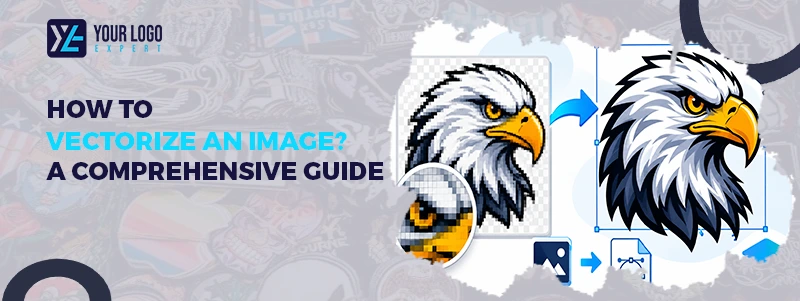
How to Vectorize an Image? A Comprehensive Guide
Does your logo look blurry when you enlarge it? This can affect your branding and printing quality. Vectorizing an image solves this problem by turning pixel-based artwork into scalable graphics.
Whether you are a business owner, designer, or print shop, vector images help keep your designs clear at any size. In the next 8 minutes, we will explain how to vectorize an image, compare different methods, and help you choose the right tool.
What Does It Mean to Vectorize an Image?
Image vectorization means converting a raster image into a vector format. Raster images use pixels and include formats like JPG and PNG. When enlarged, they can become blurry. Vector images use lines, curves, and shapes. They stay sharp at any size and are commonly saved as AI, SVG, EPS, or vector PDF files.
Get Your Artwork Ready!
Raster vs Vector Images: What Is the Difference?
Feature | Raster Image | Vector Image |
Structure | Pixels | Paths and shapes |
Quality | Can blur when enlarged | Stays sharp |
Formats | JPG, PNG | AI, SVG, EPS |
Best for | Photographs | Logos and illustrations |
Editing | Pixel-based | Shape-based |
Why Should You Vectorize an Image?
Vectorization offers several benefits for businesses and designers. If you want to convert your artwork into embroidery-ready files, consider our custom digitizing service.
- Scalable Designs: Resize your artwork without losing sharpness.
- Easy Editing: Change colors, shapes, and design elements with ease.
- Better Printing: Create clean artwork for T-shirts, banners, signs, and business cards.
- Brand Consistency: Keep your logo clear across websites, packaging, and promotional products.
How to Vectorize an Image: 4 Simple Methods
You can use different design tools to convert raster images into vector graphics.
01: Using Adobe Illustrator
Adobe Illustrator offers an Image Trace feature for converting JPG and PNG images into vector artwork.
Steps:
- Open Adobe Illustrator.
- Import your image.
- Select the Image Trace option.
- Choose a suitable preset.
- Adjust colors and details.
- Click Expand to create editable paths.
- Save as AI, SVG, or EPS.
02: Using CorelDRAW
CorelDRAW uses PowerTRACE to convert bitmap images into vector graphics. If you want clean, scalable vector files from raster images, consider our vector art conversion service.
Steps:
- Open CorelDRAW.
- Import your image.
- Select Trace Bitmap.
- Choose a tracing method.
- Adjust the settings.
- Review and edit the artwork.
- Save your vector file.
03: Using Inkscape
Inkscape is a free tool with a Trace Bitmap feature.
Steps:
- Open Inkscape.
- Import your image.
- Select the image.
- Go to Path and choose Trace Bitmap.
- Adjust the settings.
- Apply the changes.
- Save as SVG.
04: Manual Vectorization
Manual vectorization involves tracing an image using Pen or Bezier tools. A designer creates each shape and curve by hand. This method takes more time but offers better control over details and accuracy. It is suitable for complex logos, custom artwork, and designs that need precise editing.
Automatic vs Manual Vectorization: Which Is Better?
Both methods can convert images into vector formats, but their results may differ.
Feature | Automatic | Manual |
Speed | Faster | Slower |
Accuracy | Depends on image quality | Greater control |
Editing | May need cleanup | More control |
Best for | Simple images | Detailed artwork |
Automatic tracing works well for simple logos and graphics. Manual tracing is better for complex designs that need clean paths and accurate details. If you want high-quality, full-color designs for custom apparel, consider our DTF transfers service.
What Makes a Good Vector Image?
A good vector image should have smooth curves, clean edges, and accurate colors. It should also be easy to edit and suitable for its intended use. Always check the final artwork before printing. Make sure the file format meets your printer’s requirements.
When Should You Hire a Professional Vector Art Service?
Free tools can handle simple conversions, but complex images often need manual editing. A professional designer can recreate artwork with clean paths, smooth edges, and accurate details. This is especially useful for logos, custom apparel, embroidery, and promotional products.
Your Logo Experts provides professional vector art conversion with a focus on quality, accurate results, and fast turnaround. Need a clean vector file for your next project? Contact Your Logo Experts today and get a free quote!
Our Services
Get Started
Frequently Asked Questions
It means converting a pixel-based image into editable vector graphics.
Yes. You can convert JPG files using vector design software.
Adobe Illustrator, CorelDRAW, and Inkscape are popular options.
Yes. Inkscape is a free, open-source design tool.
AI, SVG, EPS, and vector PDF are common formats.
Yes, but blurry images may need manual editing.
It creates scalable artwork but cannot restore missing details automatically.
Manual tracing offers greater control and accuracy.
Yes. They are commonly used for apparel, signs, and promotional products.
Pricing depends on design complexity and turnaround time.
Useful Links
Company Info
- +1 (816) 465-9624
- info@yourlogoexpert.com
- 2501 Chatham Rd STE 4504, Springfield, IL, United States, 62704
Copyright © 2026 Your Logo Expert. All Rights Reserved.
